Improving Portainer Security
Posted on 26 February 2026 by Sifis Bampionitakis

In November 2025, as part of my Internship in Cybersecurity Research I examined the security model of Portainer, a popular open source project for container management.
Beyond its use in production systems where the person managing the containers is a systems administrator responsible for the production environment, Portainer is also used today internally by development teams to deploy test services. In such scenarios it may very well be the case that the person deploying a test / short-lived service is not the systems administrator of the container hosting environment. Moreover, teams may require their own private containers (for compliance reasons etc.) and therefore it is not generally the case that all users of Portainer should have access to all available containers.
During my research I found that Portainer (Community Edition, version 2.33.2) granted, by default, excessive privileges to regular user accounts. These privileges could be abused for host takeover.
In particular, the following “Endpoint Security” privileges are set by default on regular user accounts:
{
    "allowBindMountsForRegularUsers": true,
    "allowPrivilegedModeForRegularUsers": true,
    "allowVolumeBrowserForRegularUsers": false,
    "allowHostNamespaceForRegularUsers": true,
    "allowDeviceMappingForRegularUsers": true,
    "allowStackManagementForRegularUsers": true,
    "allowContainerCapabilitiesForRegularUsers": true,
    "allowSysctlSettingForRegularUsers": true,
    "enableHostManagementFeatures": false
}
We are interested in the ones that are set to true, therefore:
allowBindMountsForRegularUsers: Enables regular users to bind mount any host path to a path in a container instanceallowPrivilegedModeForRegularUsers: Enables regular users to start a container in privileged mode that would allow the root user of the container to gain command execution with root’s capabilities on the host systemallowHostNamespaceForRegularUsers: Enables regular users to start a container with processes that share the host’s process ID namespace and host’s IPC namespaceallowDeviceMappingForRegularUsers: Enables regular users to start a container that has access to host devicesallowStackManagementForRegularUsers: Enables regular users to manage a container stack (based on a docker compose file, triggered by a webhook etc.)allowContainerCapabilitiesForRegularUsers: Enables regular users to select a set of root capabilities that will be available to containersallowSysctlSettingForRegularUsers: Enables regular users to use thesysctlinterface to recreate, duplicate or edit containers
Proof of concept exploitation
As a proof-of-concept I have created a script that abuses the allowBindMountsForRegularUsers privilege of a regular user to read a privileged file (/etc/shadow) from the host.
For the PoC you will need a Portainer CE 2.33.2 default installation and a Regular User account (i.e. a non-administrative account).
The PoC script can be found here.
Be sure to replace the username and password in the script file to those of the regular user account you have created.
Running the script gives the following output:
sifis@sifis-IntWave:~$ chmod +x ./portainer-priv.sh
sifis@sifis-IntWave:~$ ./portainer-priv.sh
[*] Listing all available endpoints:
{
  "Id": 3,
  "Name": "local",
  "Type": 1,
  "URL": "unix:///var/run/docker.sock"
}
[*] Checking for alpine:latest image...
[*] Alpine image already available

[*] Reading /etc/shadow from host...
{"Id":"747a427e0df7f6786992cad3c27251a42fa0e326dd4af962af2407fbb6d6eb10","Portainer":{"ResourceControl":{"Id":12,"ResourceId":"747a427e0df7f6786992cad3c27251a42fa0e326dd4af962af2407fbb6d6eb10","SubResourceIds":[],"Type":1,"UserAccesses":[{"UserId":2,"AccessLevel":1}],"TeamAccesses":[],"Public":false,"AdministratorsOnly":false,"System":false}},"Warnings":[]}
[*] /etc/shadow contents saved to portainer_vulnerability_secret/etc_shadow.txt
Now we can inspect the collected host /etc/shadow file:
sifis@sifis-IntWave:~$ cat portainer_vulnerability_secret/etc_shadow.txt
root:*:20134:0:99999:7:::
daemon:*:20134:0:99999:7:::
bin:*:20134:0:99999:7:::
sys:*:20134:0:99999:7:::
sync:*:20134:0:99999:7:::
games:*:20134:0:99999:7:::
man:*:20134:0:99999:7:::
lp:*:20134:0:99999:7:::
mail:*:20134:0:99999:7:::
news:*:20134:0:99999:7:::
uucp:*:20134:0:99999:7:::
proxy:*:20134:0:99999:7:::
www-data:*:20134:0:99999:7:::
backup:*:20134:0:99999:7:::
list:*:20134:0:99999:7:::
irc:*:20134:0:99999:7:::
_apt:*:20134:0:99999:7:::
nobody:*:20134:0:99999:7:::
systemd-network:!*:20134::::::
systemd-timesync:!*:20134::::::
dhcpcd:!:20134::::::
messagebus:!:20134::::::
syslog:!:20134::::::
systemd-resolve:!*:20134::::::
uuidd:!:20134::::::
usbmux:!:20134::::::
tss:!:20134::::::
systemd-oom:!*:20134::::::
kernoops:!:20134::::::
whoopsie:!:20134::::::
dnsmasq:!:20134::::::
avahi:!:20134::::::
tcpdump:!:20134::::::
sssd:!:20134::::::
speech-dispatcher:!:20134::::::
cups-pk-helper:!:20134::::::
fwupd-refresh:!*:20134::::::
saned:!:20134::::::
geoclue:!:20134::::::
cups-browsed:!:20134::::::
hplip:!:20134::::::
gnome-remote-desktop:!*:20134::::::
polkitd:!*:20134::::::
rtkit:!:20134::::::
colord:!:20134::::::
gnome-initial-setup:!:20134::::::
gdm:!:20134::::::
nm-openvpn:!:20134::::::
sifis:$6$..redacted..:20373:0:99999:7:::
vboxadd:!:20373::::::
Recommendations
All versions of Portainer prior to 2.38.0 are affected by the issue.
Portainer introduced a fix for this issue in version 2.38.0 (Short Term Support) and version 2.39.0 (Long Term Support). From these versions onwards the default settings of Portainer are much more restricted, as illustrated in the following code:
func DefaultEndpointSecuritySettings() EndpointSecuritySettings {
	return EndpointSecuritySettings{
		AllowBindMountsForRegularUsers:            false,
		AllowContainerCapabilitiesForRegularUsers: false,
		AllowDeviceMappingForRegularUsers:         false,
		AllowHostNamespaceForRegularUsers:         false,
		AllowPrivilegedModeForRegularUsers:        false,
		AllowSysctlSettingForRegularUsers:         false,
		AllowVolumeBrowserForRegularUsers:         false,
		EnableHostManagementFeatures:              false,

		AllowStackManagementForRegularUsers: true,
	}
}
Therefore it is now possible to use a default Portainer installation in an environment with potentially untrusted users (and potentially untrusted images) without fully compromising the security of the host. Further hardening is advised in such setups (e.g. to apply resource consumption limits to newly created containers).
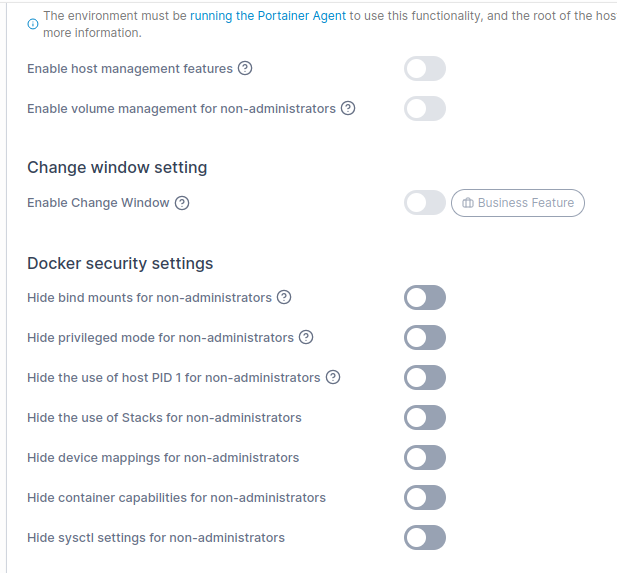
If you are using Portainer in an environment with potentially untrusted users we strongly recommend upgrading to a version of Portainer carrying the fix and reviewing the Docker Security Settings (see Figure 1) of your setup.