Secure deletion of data on littlefs
Posted on 29 June 2026 by Giorgos Bakamidis

Secure Deletion of Data as an embedded system requirement
Having a mechanism for the secure deletion of data is becoming a hard requirement in embedded systems.
The EU RED Delegated Act [1] [2] requires that IoT devices that process personal data, traffic data or location data (and specifically internet connected radio equipment, radio equipment designed or intended exclusively for childcare, toys and wearable radio equipment) must be aligned with the EN 18031-2 standard in order to carry the CE marking.
The EN 18031-2 standard dictates in requirement DLM-1 that a secure deletion mechanism is needed on the device to support the removal of personal data and sensitive security parameters. The intent behind this control is to allow the device to change ownership or be disposed in a manner that would not create privacy or security concerns for its previous owner.
The EU Cyber Resiliance Act (CRA) imposes a similar requirement to products with digital elements that enter the EU market. Specifically, in the Essential Cybersecurity Requirements of Annex I, Part I, par. (2)(m), the regulation requires from products to enable users to easily and securely remove, on a permanent basis, data and settings.
Moreover, a secure data deletion requirement also appears in widely adopted cybersecurity standards such as:
- IEC 62443-4-2 for industrial equipment (see Common Requirement 4.2), and
- ETSI EN 303 645 for consumer IoT equipment (see Section 5.11).
Application Level vs Storage Level deletion of data
Embedded systems often use a filesystem to store data. Figure 1 shows an example of an application that removes the sensitive data found in a configuration file (“settings.ini”) by means of deleting the file and creating a new one.
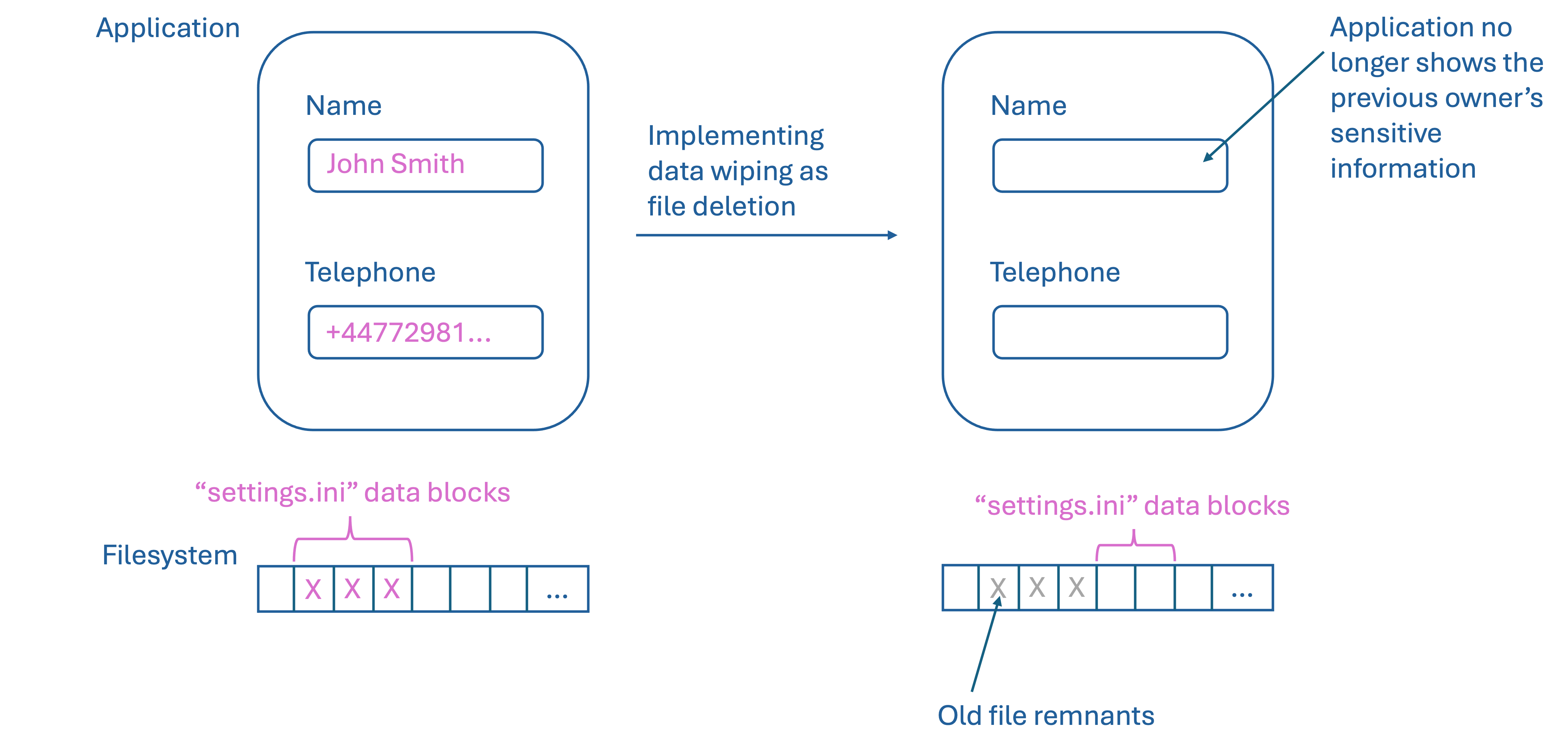
File deletion removes the name (i.e. the reference) that had been associated with the old blocks of data; in most filesystems, deletion does not wipe the old data blocks. Parts of the old data may remain in the storage medium until another file (or filesystem metadata) uses that space. Creating a new file under the same name, would create a new reference to a set of blocks, which may be completely different blocks to the ones that had originally been allocated for the file that was deleted.
Now let’s look at this from the application user’s perspective. After file deletion, the application will no longer have access to the original data (in our example, the previous owner’s name and telephone) and therefore this data will not be used or presented anywhere through the application. But is this a secure data wiping mechanism?
If someone gained access to the storage device (e.g. through an open debugging interface), or exploited a vulnerability in the application (or other embedded firmware component) they might be able to retrieve the original data (or parts of it) based on remnants found in the filesystem blocks. Therefore, the removal of a file cannot be used as a secure wiping mechanism to protect the previous owner’s data.
As we will see shortly, the implementation details of a filesystem might not even allow for the overwriting of the file to work as a secure wiping mechanism.
A short intro to flash memory technologies
NOR / NAND flash technologies, as used in on-chip flash memory, have two fundamental write operations:
- During memory initialization, they set all bits to 1
- When writing a value, they may turn selected bits to 0
Therefore, to overwrite a previously stored value with an arbitrary value, one needs to first initialize (“erase”) the relevant part of memory and then set the new value.
old value [01010111] → erase [11111111] → set new value [10100111]
This is not the same as with, let’s say, an MCU register that can directly be assigned a new value.
NOR flash allows programming (i.e. setting a value) at byte, half-word, word or page granularity depending on the technology used. NOR flash was designed for “read often - write rarely” use.
NAND flash allows programming at the page granularity. It was designed for frequent updates and large storage.
Erasure occurs at sector granularity in NOR flash (e.g. 4KB to 64KB) and is a costly operation (as it may take multiple milliseconds to complete and access to the flash is blocked during the erasure operation). In NAND flash erasure occurs at the block level (e.g. 128KB to 2MB) and can be more costly than the NOR flash erasure process.
NAND flash chips ship with bad blocks and develop more bad blocks over time, therefore some form of wear leveling and bad block management needs to occur for this type of data storage. This has implications on the cost of an erase or write operation. In on-chip flash, where there is no other mechanism (e.g. FTL) to transparently deal with such issues, programmers use a specially designed filesystem to distribute the data placement across different parts of the flash storage (that have not been marked as bad blocks).
Such a filesystem is the littlefs copy-on-write filesystem.
The littlefs copy-on-write filesystem
littlefs is a filesystem commonly used for file storage in on-chip flash memory. It has been adopted by many bare metal embedded projects, including Zephyr.
In littlefs, file data are kept in copy-on-write structures. If a file data block needs to change, the change is made to a copy of the original data block.
Let’s explore the behavior of littlefs by way of a simple test program.
We memory map a region of 20MB for the littlefs storage
(range 0x7feebee00000 - 0x7feec01fffff). We then fill the storage with 0xFF
bytes to emulate the flash memory initial state. Then, we call lfs_format()
to format the littlefs filesystem. The program output shows the minimal
data structures that littlefs wrote to storage during the format operation:
+ Creating LFS storage (20MB mmap)
+ Filling LFS storage with 0xFF
+ Formatting LFS filesystem
0x7feebee00000 01 00 00 00 f0 0f ff f7 6c 69 74 74 6c 65 66 73
0x7feebee00010 2f e0 00 10 01 00 02 00 00 10 00 00 00 14 00 00
0x7feebee00020 ff 00 00 00 ff ff ff 7f fe 03 00 00 7f ef fc 10
0x7feebee00030 10 00 00 00 e5 39 4c c0 0f f0 00 0c 97 6b 17 68
0x7feebee00040 ff ff ff ff ff ff ff ff ff ff ff ff ff ff ff ff
...
0x7feebee01000 02 00 00 00 f0 0f ff f7 6c 69 74 74 6c 65 66 73
0x7feebee01010 2f e0 00 10 01 00 02 00 00 10 00 00 00 14 00 00
0x7feebee01020 ff 00 00 00 ff ff ff 7f fe 03 00 00 7f ef fc 10
0x7feebee01030 10 00 00 00 e5 39 4c c0 0f f0 00 0c 47 fe 12 ec
0x7feebee01040 ff ff ff ff ff ff ff ff ff ff ff ff ff ff ff ff
...
Throughout this article, the three dots (…) in hexadecimal dumps denote that the bytes that follow are exactly the same as those of the last printed line.
Mounting the filesystem and writing a pattern of “0x01 0x02 0x03 …” bytes to a 20KB file creates the following data:
+ Mounting LFS filesystem
+ Max file size supported: 2147483647
+ Storing 20kb file with pattern
0x7feebee00000 01 00 00 00 f0 0f ff f7 6c 69 74 74 6c 65 66 73
0x7feebee00010 2f e0 00 10 01 00 02 00 00 10 00 00 00 14 00 00
.. output removed for brevity ..
0x7feebfade000 00 01 02 03 04 05 06 07 08 09 0a 0b 0c 0d 0e 0f
0x7feebfade010 10 11 12 13 14 15 16 17 18 19 1a 1b 1c 1d 1e 1f
0x7feebfade020 20 21 22 23 24 25 26 27 28 29 2a 2b 2c 2d 2e 2f
.. output removed for brevity ..
0x7feebfadeff0 f0 f1 f2 f3 f4 f5 f6 f7 f8 f9 fa fb fc fd fe ff
0x7feebfadf000 de 0c 00 00 00 01 02 03 04 05 06 07 08 09 0a 0b
0x7feebfadf010 0c 0d 0e 0f 10 11 12 13 14 15 16 17 18 19 1a 1b
0x7feebfadf020 1c 1d 1e 1f 20 21 22 23 24 25 26 27 28 29 2a 2b
.. and the pattern continues up to ..
0x7feebfae3010 f0 f1 f2 f3 f4 f5 f6 f7 f8 f9 fa fb fc fd fe ff
0x7feebfae3020 ff ff ff ff ff ff ff ff ff ff ff ff ff ff ff ff
...
Notice the pattern starting from 0xfeebfade000 and ending at 0xfeebfae301f. The “0xde 0x0c” bytes at 0x7feebfadf000 are filesystem metadata.
Let’s now explore the implications of different data wiping mechanisms:
- Overwriting a file’s data
- Deleting a file
- Formatting the filesystem
- Replacing all data in the filesystem with a single large file
- Erasing the flash memory filesystem blocks
- Cryptographic erase
Overwriting a file’s data
We will open the same file we created in the previous section but this time we will write 1KB of 0x99 bytes in the beginning of that file. We see that the original blocks holding the file data have been left intact (see address range 0xfeebfade000 - 0xfeebfae301f) but new blocks have now been allocated (see address range 0x7feebfae4000 - 0x7feebfae901f) to carry the needed change (1KB of 0x99 bytes, from 0x7feebfae4000 to 0x7feebfae43ff) plus the rest of the file contents (0x7feebfae4400 to 0x7feebfae901f).
+ Writing 1kb of 0x99 to start of file
0x7feebee00000 01 00 00 00 f0 0f ff f7 6c 69 74 74 6c 65 66 73
0x7feebee00010 2f e0 00 10 01 00 02 00 00 10 00 00 00 14 00 00
.. output removed for brevity ..
0x7feebfade000 00 01 02 03 04 05 06 07 08 09 0a 0b 0c 0d 0e 0f
0x7feebfade010 10 11 12 13 14 15 16 17 18 19 1a 1b 1c 1d 1e 1f
0x7feebfade020 20 21 22 23 24 25 26 27 28 29 2a 2b 2c 2d 2e 2f
0x7feebfade030 30 31 32 33 34 35 36 37 38 39 3a 3b 3c 3d 3e 3f
0x7feebfade040 40 41 42 43 44 45 46 47 48 49 4a 4b 4c 4d 4e 4f
.. output removed for brevity ..
0x7feebfae3020 ff ff ff ff ff ff ff ff ff ff ff ff ff ff ff ff
...
0x7feebfae4000 99 99 99 99 99 99 99 99 99 99 99 99 99 99 99 99
...
0x7feebfae4400 00 01 02 03 04 05 06 07 08 09 0a 0b 0c 0d 0e 0f
0x7feebfae4410 10 11 12 13 14 15 16 17 18 19 1a 1b 1c 1d 1e 1f
0x7feebfae4420 20 21 22 23 24 25 26 27 28 29 2a 2b 2c 2d 2e 2f
0x7feebfae4430 30 31 32 33 34 35 36 37 38 39 3a 3b 3c 3d 3e 3f
0x7feebfae4440 40 41 42 43 44 45 46 47 48 49 4a 4b 4c 4d 4e 4f
.. output removed for brevity ..
0x7feebfae9010 f0 f1 f2 f3 f4 f5 f6 f7 f8 f9 fa fb fc fd fe ff
0x7feebfae9020 ff ff ff ff ff ff ff ff ff ff ff ff ff ff ff ff
...
The program output proves that overwriting a file’s contents in littlefs should not be considered as a mechanism for secure data wiping. The original file contents are still present in the storage medium after the overwrite procedure completes.
Deleting a file
Now let’s delete the file and inspect the filesystem state.
The following output shows that both the “0x01 0x02 0x03 …” and “0x99” data patterns are still there (see memory ranges 0x7feebfade000 - 0x7feebfae301f and 0x7feebfae4000 - 0x7feebfae901f):
+ Deleting numbers.bin
0x7feebee00000 01 00 00 00 f0 0f ff f7 6c 69 74 74 6c 65 66 73
0x7feebee00010 2f e0 00 10 01 00 02 00 00 10 00 00 00 14 00 00
0x7feebee00020 ff 00 00 00 ff ff ff 7f fe 03 00 00 7f ef fc 10
0x7feebee00030 10 00 00 00 e5 39 4c c0 0f f0 00 0c 97 6b 17 68
0x7feebee00040 ff ff ff ff ff ff ff ff ff ff ff ff ff ff ff ff
...
0x7feebee01000 02 00 00 00 f0 0f ff f7 6c 69 74 74 6c 65 66 73
0x7feebee01010 2f e0 00 10 01 00 02 00 00 10 00 00 00 14 00 00
0x7feebee01020 ff 00 00 00 ff ff ff 7f fe 03 00 00 7f ef fc 10
0x7feebee01030 10 00 00 00 e5 39 4c c0 0f f0 00 0c 47 fe 12 ec
0x7feebee01040 10 1f f8 04 40 00 00 0b 6e 75 6d 62 65 72 73 2e
0x7feebee01050 62 69 6e 20 00 00 0b 7f ef f8 08 10 00 00 00 e5
0x7feebee01060 39 4c c0 0f f0 00 01 d3 96 28 a1 ff ff ff ff ff
0x7feebee01070 70 2f f8 01 e3 0c 00 00 00 50 00 00 7f df f8 00
0x7feebee01080 10 00 00 00 e5 39 4c c0 0f f0 00 0c 7a 85 84 53
0x7feebee01090 70 2f f8 0c e9 0c 00 00 00 50 00 00 7f df f8 00
0x7feebee010a0 10 00 00 00 e5 39 4c c0 0f f0 00 0c 89 3c 8f 2a
0x7feebee010b0 1f ff f8 04 10 0f f8 08 10 00 00 00 e5 39 4c c0
0x7feebee010c0 0f f0 00 04 00 64 16 fd ff ff ff ff ff ff ff ff
...
0x7feebfade000 00 01 02 03 04 05 06 07 08 09 0a 0b 0c 0d 0e 0f
0x7feebfade010 10 11 12 13 14 15 16 17 18 19 1a 1b 1c 1d 1e 1f
0x7feebfade020 20 21 22 23 24 25 26 27 28 29 2a 2b 2c 2d 2e 2f
0x7feebfade030 30 31 32 33 34 35 36 37 38 39 3a 3b 3c 3d 3e 3f
0x7feebfade040 40 41 42 43 44 45 46 47 48 49 4a 4b 4c 4d 4e 4f
0x7feebfade050 50 51 52 53 54 55 56 57 58 59 5a 5b 5c 5d 5e 5f
.. output removed for brevity ..
0x7feebfae3010 f0 f1 f2 f3 f4 f5 f6 f7 f8 f9 fa fb fc fd fe ff
0x7feebfae3020 ff ff ff ff ff ff ff ff ff ff ff ff ff ff ff ff
...
0x7feebfae4000 99 99 99 99 99 99 99 99 99 99 99 99 99 99 99 99
...
0x7feebfae4400 00 01 02 03 04 05 06 07 08 09 0a 0b 0c 0d 0e 0f
0x7feebfae4410 10 11 12 13 14 15 16 17 18 19 1a 1b 1c 1d 1e 1f
.. output removed for brevity ..
0x7feebfae9010 f0 f1 f2 f3 f4 f5 f6 f7 f8 f9 fa fb fc fd fe ff
0x7feebfae9020 ff ff ff ff ff ff ff ff ff ff ff ff ff ff ff ff
...
The filesystem has simply marked the relevant blocks as being free for use.
The program output proves that file deletion in littlefs cannot be used as a mechanism for secure data wiping.
Formatting the filesystem
Now, let’s unmount and format the filesystem to see if the data remnants will be removed.
+ Unmounting LFS filesystem
+ Formatting LFS filesystem
0x7feebee00000 f6 01 00 00 f0 0f ff f7 6c 69 74 74 6c 65 66 73
0x7feebee00010 2f e0 00 10 01 00 02 00 00 10 00 00 00 14 00 00
0x7feebee00020 ff 00 00 00 ff ff ff 7f fe 03 00 00 7f ef fc 10
0x7feebee00030 10 00 00 00 e5 39 4c c0 0f f0 00 0c 71 7c 07 80
0x7feebee00040 ff ff ff ff ff ff ff ff ff ff ff ff ff ff ff ff
...
0x7feebee01000 f7 01 00 00 f0 0f ff f7 6c 69 74 74 6c 65 66 73
0x7feebee01010 2f e0 00 10 01 00 02 00 00 10 00 00 00 14 00 00
0x7feebee01020 ff 00 00 00 ff ff ff 7f fe 03 00 00 7f ef fc 10
0x7feebee01030 10 00 00 00 e5 39 4c c0 0f f0 00 0c fe f2 d4 4a
0x7feebee01040 ff ff ff ff ff ff ff ff ff ff ff ff ff ff ff ff
...
0x7feebfade000 00 01 02 03 04 05 06 07 08 09 0a 0b 0c 0d 0e 0f
0x7feebfade010 10 11 12 13 14 15 16 17 18 19 1a 1b 1c 1d 1e 1f
0x7feebfade020 20 21 22 23 24 25 26 27 28 29 2a 2b 2c 2d 2e 2f
.. output removed for brevity ..
0x7feebfae3010 f0 f1 f2 f3 f4 f5 f6 f7 f8 f9 fa fb fc fd fe ff
0x7feebfae3020 ff ff ff ff ff ff ff ff ff ff ff ff ff ff ff ff
...
0x7feebfae4000 99 99 99 99 99 99 99 99 99 99 99 99 99 99 99 99
...
0x7feebfae4400 00 01 02 03 04 05 06 07 08 09 0a 0b 0c 0d 0e 0f
0x7feebfae4410 10 11 12 13 14 15 16 17 18 19 1a 1b 1c 1d 1e 1f
0x7feebfae4420 20 21 22 23 24 25 26 27 28 29 2a 2b 2c 2d 2e 2f
.. output removed for brevity ..
0x7feebfae9010 f0 f1 f2 f3 f4 f5 f6 f7 f8 f9 fa fb fc fd fe ff
0x7feebfae9020 ff ff ff ff ff ff ff ff ff ff ff ff ff ff ff ff
Just as we showed initially, lfs_format() has no effect on the data blocks
(the memory ranges 0x7feebfade000 - 0x7feebfae301f and 0x7feebfae4000 - 0x7feebfae901f still hold their original data).
This test proves that formatting a littlefs filesystem cannot be used as a mechanism for secure data wiping.
Replacing all data on the filesystem with a single large file
Now let’s mount the filesystem and create the largest file we can with the “0xFF” byte pattern.
+ Mounting LFS filesystem
+ Storing large file with 0xff
lfs.c:702:error: No more free space 0x6bf
+ Stopped large file creation at 20922368 bytes (filesystem full)
+ Closing large file, unmounting filesystem
0x7feebee00000 f6 01 00 00 f0 0f ff f7 6c 69 74 74 6c 65 66 73
0x7feebee00010 2f e0 00 10 01 00 02 00 00 10 00 00 00 14 00 00
0x7feebee00020 ff 00 00 00 ff ff ff 7f fe 03 00 00 7f ef fc 10
0x7feebee00030 10 00 00 00 e5 39 4c c0 0f f0 00 0c 71 7c 07 80
0x7feebee00040 ff ff ff ff ff ff ff ff ff ff ff ff ff ff ff ff
...
0x7feebee01000 f7 01 00 00 f0 0f ff f7 6c 69 74 74 6c 65 66 73
0x7feebee01010 2f e0 00 10 01 00 02 00 00 10 00 00 00 14 00 00
0x7feebee01020 ff 00 00 00 ff ff ff 7f fe 03 00 00 7f ef fc 10
0x7feebee01030 10 00 00 00 e5 39 4c c0 0f f0 00 0c fe f2 d4 4a
0x7feebee01040 10 1f f8 04 40 00 00 0c 62 69 67 5f 66 69 6c 65
0x7feebee01050 2e 62 69 6e 20 00 00 0c 7f ef f8 08 10 00 00 00
0x7feebee01060 e5 39 4c c0 0f f0 00 00 f2 17 6d f5 ff ff ff ff
0x7feebee01070 ff ff ff ff ff ff ff ff ff ff ff ff ff ff ff ff
...
0x7feebee02000 ff 13 00 00 ff ff ff ff ff ff ff ff ff ff ff ff
0x7feebee02010 ff ff ff ff ff ff ff ff ff ff ff ff ff ff ff ff
...
0x7feebee03000 02 00 00 00 ff 13 00 00 ff ff ff ff ff ff ff ff
0x7feebee03010 ff ff ff ff ff ff ff ff ff ff ff ff ff ff ff ff
...
.. output removed for brevity ..
0x7feebfade000 dd 0c 00 00 ff ff ff ff ff ff ff ff ff ff ff ff
0x7feebfade010 ff ff ff ff ff ff ff ff ff ff ff ff ff ff ff ff
...
0x7feebfadf000 de 0c 00 00 dd 0c 00 00 db 0c 00 00 d7 0c 00 00
0x7feebfadf010 cf 0c 00 00 bf 0c 00 00 ff ff ff ff ff ff ff ff
0x7feebfadf020 ff ff ff ff ff ff ff ff ff ff ff ff ff ff ff ff
...
.. output removed for brevity ..
0x7feec01ff000 fe 13 00 00 fd 13 00 00 fb 13 00 00 f7 13 00 00
0x7feec01ff010 ef 13 00 00 df 13 00 00 bf 13 00 00 ff ff ff ff
0x7feec01ff020 ff ff ff ff ff ff ff ff ff ff ff ff ff ff ff ff
...
The output of our test shows that once the file has been created there is no leakage of the original data. Developers may then delete the large file to reclaim the available space.
But there’s a catch here, which we will explore later: we consider that all storage blocks are in good condition.
Therefore, the creation of a large file occupying the available space and the subsequent deletion of that file could be used as a secure data wiping procedure (in the absence of problematic blocks).
Erasing the flash memory filesystem blocks
But if we are creating a huge file, isn’t it more efficient to simply erase all filesystem-related blocks from flash storage?
Each write operation in the large file creation would check whether the write succeeded (i.e. if it was possible to set the bits to 0xFF) and if this was not possible it would trigger a subsequent erase operation on the relevant block of the flash storage medium.
Instead of doing this we can directly initiate on the flash memory an erasure on all blocks relevant to the filesystem. This erasure mechanism is usually available through a HAL function or device driver functionality (i.e. we are working at a layer lower than the filesystem API).
Thus erasing all blocks available to the filesystem and then formatting the filesystem could in some situations be a faster alternative for secure data wiping (in the absence of problematic blocks).
Problematic blocks
Are the creation of the large file or erasure of filesystem data blocks reliable methods to perform secure data wiping?
There may be cases where due to wear in (mostly NAND) flash memory, a particular block continues to be readable for some time, but is no longer writable (or erasable). In such cases it may be possible, for a period of time, to collect the old information before reads become impossible as well.
Therefore problematic blocks may create conditions where the large file allocation strategy or the erasure of flash storage cannot work reliably as secure wiping procedures.
Cryptographic erase
Could we somehow make the filesystem copy-on-write behavior (and problematic block exposures) not affect data privacy?
NIST SP 800 88r2 proposes “Cryptographic Erase” as a means for media sanitization. In this approach, the sensitive data are always stored encrypted in the storage medium (e.g. in our case in files in flash storage). The key used for the symmetric encryption of this information is then destroyed during the secure data wiping procedure.
Destruction of the key may involve the overwriting of the key, or the reset of the key in a cryptographic co-processor.
Developers may choose to apply an authenticated encryption algorithm (like AES-GCM) to also identify unauthorized changes to the ciphertext, each time they process the encrypted data.
Conclusions
To perform secure deletion of file data in on-chip flash memory we would generally recommend to consider the “Cryptographic erase” approach.
If this is not possible due to project constraints, then one may consider the approach of erasing all filesystem-related blocks from device storage, or replacing all data with the largest possible file (if most blocks on the filesystem remain in their initial state). However, as we explained in this post there is some probability of data leakage in these two approaches, if sensitive data ever becomes part of problematic blocks of flash storage.
Overwriting a file’s data, deleting a file or formatting the filesystem should not be considered as secure data wiping procedures if littlefs is used for file storage in on-chip flash memory.
Thanks
Many thanks to Dimitris Glynos and Rayd Debbas for reviewing this article and for their helpful comments.